01
Connected CLIs
Use the agents you already trust.
Connect the CLIs already installed on your machine. Switch provider, account, model, and reasoning effort without changing the shape of your workflow.
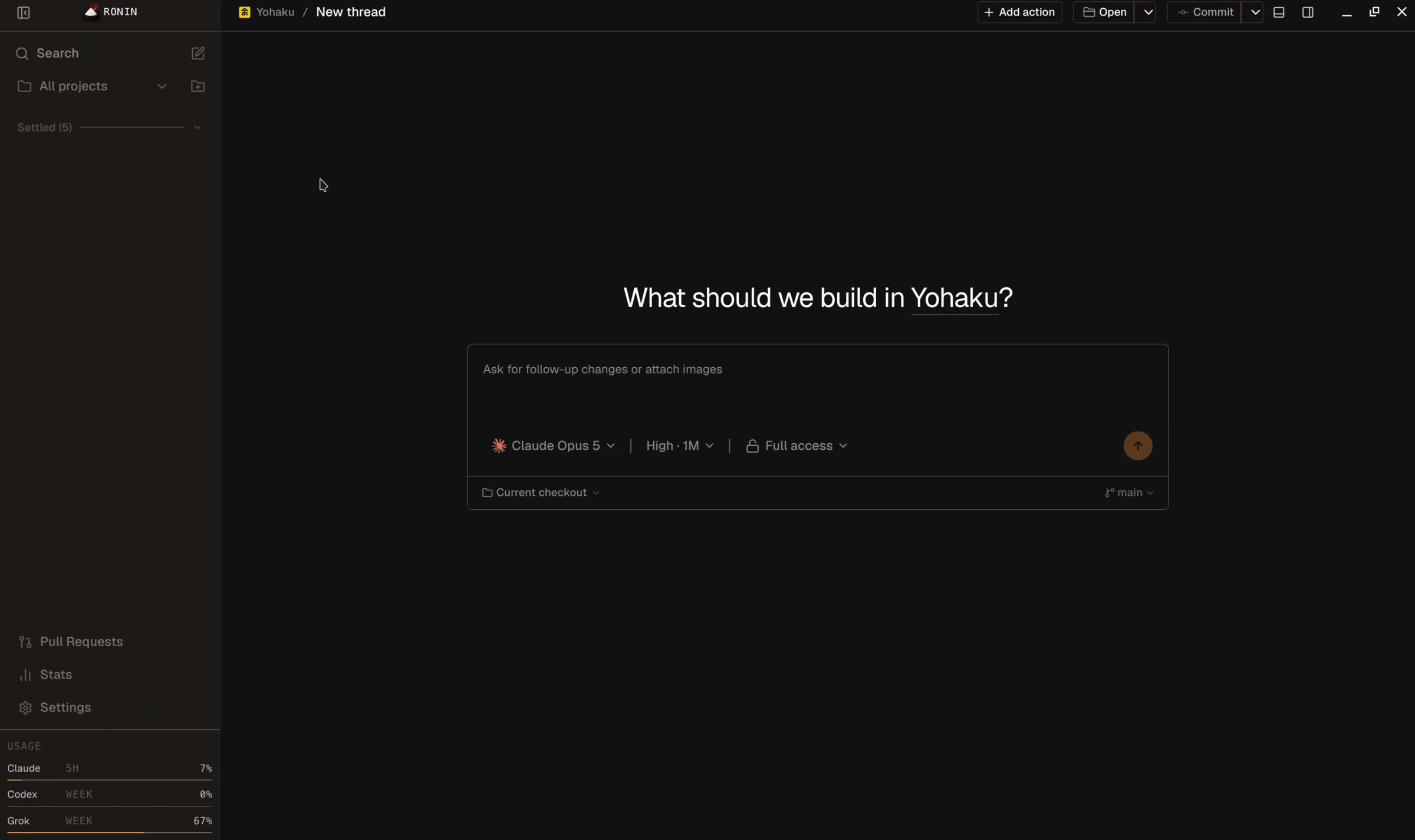
Bring your coding agents, terminal, browser, diffs, and source control together in one local-first desktop workspace — then hand a live thread from one agent to the next, or name a team and let the lead hand the work around.
Why Ronin
Coding agents are powerful in a terminal. They become practical when you can see the work, set the limits, compare the changes, and ship with intent. Ronin gives that loop a focused interface.
Core system
Connected CLIs
Connect the CLIs already installed on your machine. Switch provider, account, model, and reasoning effort without changing the shape of your workflow.
Permission boundary
Choose Supervised, Auto-accept edits, Auto, or Full access before the work begins. Approvals appear inline when the agent reaches a boundary.
Source control
Review diffs, restore a checkpoint, isolate work in a worktree, commit, push, and open the pull request without losing the thread.
Local execution
Provider processes, terminals, filesystem reads, and git operations run on the server you control. Connect over LAN, Tailscale, or SSH when you need distance.
The product
The primary object is a thread with a repository behind it. Everything else— terminal, browser, usage, diff, and source control—stays close enough to act on.
Workspace
Compose with any connected agent, choose its model and autonomy, then keep the terminal, preview, diff, and git state in the same working context.
Stats that count everything
Ronin reads each provider's own session transcripts — including turns you ran in a bare terminal — and prices them at the full API rate. A real month from the maintainer's machine, not a claim about yours:
if billed at full API rate
398M per active day
2.34B of observed input
6.2× the raw token cost
Inside a thread
The conversation is the working surface. Hand it to another agent, fork it for a second opinion, question one paragraph on the side, or play the whole turn back — without leaving the repository it belongs to.
Provider hand-off
Start with Codex, hit a wall, hand the thread to Claude. Same history, same checkpoints, same working directory. An agent that has been here before resumes its own session; a newcomer gets a brief built from the thread.
DocumentationA thread hands off from codex to claude, carrying its history, checkpoints, and working directory. The session resumes at turn 24.
Second opinion
Press Compare, pick who should answer, and the same prompt runs on each model in its own worktree. They read as ordinary threads with chips to jump between. Keep the one you like; delete the rest.
DocumentationOne prompt runs twice: claude-opus-5 in worktree A, kept, and gpt-5.6-sol in worktree B, discarded.
Side chats
Select the passage you are stuck on and a chip appears. It opens a fresh thread on exactly that text, same project, same checkout. The main thread never learns you asked.
DocumentationA sentence in the transcript is selected, and an “Ask on the side” chip opens a separate thread on just that passage. The main thread is untouched.
Captured tasks
Agents leave work behind in the transcript. Select it, press Capture, and Ronin files a draft thread that is ready on every device — while you stay exactly where you were reading.
DocumentationA line in the transcript is selected and filed as a draft thread titled “Drop dead helper”, already synced.
Turn replay
The prompt, each tool call, and the reply play back in order, with the pauses compressed, so you see the rhythm of the work without sitting through the dead air.
DocumentationA twenty-one minute turn replays on a scrubber holding twelve tool calls, paused at 7 minutes 42, with the dead air between calls compressed.
Build systems
Claude leads, Codex implements, Grok reviews — or any roster you name. You define the roles; the lead hands work around in one shared worktree until the task is done. Gate a role if you want to see it coming. Not the default; you build the team.
DocumentationRun a build system
Split the auth guarddoes not edit · handed work to implement
wrote src/server/auth.ts
paused until you approve
The lead
It decides what happens next, hands a piece of work to a teammate, reads what came back, and either delegates again, asks you a question, or finishes.
Shared checkout
Each teammate gets its own thread the first time it is asked to work, in the same worktree as the lead. A file one of them writes is a file the next one sees.
Ask first
A gated role pauses the run until you approve or decline the task. Decline with a note the lead will read. The lead thread also lands in Needs you.
Board & queue
Six lanes — Draft, Up Next, Working, Needs You, Snoozed, Done. Drag to settle something, snooze it, or pick the next thing up. The sidebar and the board never disagree, because they read the same threads.
DocumentationSplit the router
Drop dead helper
Port tests to Vitest
Refactor auth guard
Audit bundle size
Approve rm -rf dist
Bump deps
Fix flaky preview test
Ship v0.6 notes
Quota resume
A spent five-hour window is not a failure you can act on. Ronin parks the message, counts down above the composer, and sends it the moment the window resets. Cancel it, fire it early, or walk away.
A queued message, “rerun the migration”, waits on a spent quota window. The window resets in 41 minutes 12 seconds.
DocumentationNeeds you
Anything that stopped until you answer collects in a sidebar queue and a dock badge. A system notification fires when a turn finishes, fails, or waits for approval.
Two things are waiting on you: three approvals for the command rm -rf dist, and a question asking which router to use.
Since you last looked
What finished, what is still running, and what is waiting on you — gathered for the moment you sit back down.
Four turns finished, one is still running, and two are waiting on you.
DocumentationWorking loop
From intent to merge
Every turn has a visible state. Every change can be inspected. Every branch can stay isolated. You decide when the result is ready to leave the machine.
Give the agent the repo, model, effort, and permission boundary.
Watch commands, edits, terminal output, and browser actions arrive in context.
Read the latest-turn diff, leave line comments, or restore a checkpoint.
Commit, push, and open the pull request from the workspace header.
Browser preview / MCP
Ronin exposes fourteen focused browser tools to the active agent—navigation, interaction, snapshots, appearance control, and recording—against your real dev server.
preview_openpreview_clickpreview_typepreview_snapshotpreview_recording_startA preview session against localhost:3000: preview_open returned 200, preview_snapshot is ready, a preview_click on Deploy is done, and preview_wait_for is still running against the text "Success". Four actions, no failures, 42.8 seconds.
Make it yours
Everything past the conversation: skills every provider can read, work that runs while you sleep, the same threads on your phone, and a surface you can actually stand to look at all day.
Portable skills
Drop a SKILL.md in ~/.ronin/skills and every connected provider can use it. Slash commands work the same way, next to each CLI's native ones.
~/.ronin/skills/review-pr/SKILL.md/clear/compact/model/review/forkAutomations
Save a prompt, pick a schedule, walk away. Each run is a real thread you can read afterwards, defaulting to its own worktree so unattended edits never land in your checkout.
sweep the flaky testsworktreesummarise last weekworktreeRemote access
Pair over your tailnet and scan the QR. LAN and SSH work too. The work still happens on hardware you own.
$npx t3 pair --tailscaleQRtailnetLANSSHInline previews
When an agent writes a coverage report, a chart, or a mockup, Ronin renders it in place — sandboxed, with relative assets loading. No open-this-link step.
A sandboxed coverage report renders inside the transcript, in a frame labelled coverage.html.
DocumentationAppearance
Eight OKLCH palettes ship, including the pure-black OLED Void. Search Open VSX to pull almost any VS Code theme straight in, or import your own. Light and dark both stay intact.
Eight palettes ship: Paper, Tsukimi, Graphite, Aizome, Urushi, Obsidian, Carbon, OLED Void.
Source control
A checkpoint after every turn to diff or restore; commit, branch, discard, and worktrees in the topbar; pull requests across every connected server — review, react, and edit in place.
CommitCommit & pushCommit, push & Pull requestPushStraight answers
Ronin is an open-source desktop harness for coding agents. It runs the provider CLIs already installed on your machine and gives their threads a shared interface for prompts, permissions, terminal output, browser previews, diffs, usage, and source control.
No. Ronin is an agent harness, not a text editor. The primary object is the thread and its repository context. It opens files and shows diffs when useful, then hands focused editing back to the editor you already use.
Yes. A thread can be handed from one provider to another mid-conversation and keeps its history, checkpoints, and working directory. An agent that has worked in that thread before resumes its own session; a new one receives a brief built from the thread. You can also run the same prompt on several models at once — each answer gets its own git worktree, so the attempts never collide.
A team you define for a project: one model leads, the others take roles. The orchestrator does not edit files; it hands work to teammates in one shared worktree, one agent at a time. Gate a role if you want to approve it first. You create a team in Settings → Build systems, then launch it on a task — it is not the default way a thread works.
Ronin parks the message instead of failing it, counts down to the reset above the composer, and sends it the moment the window reopens. You can cancel the queued message or send it early. The usage view also shows when each provider's window resets.
Ronin is free and MIT-licensed. It does not resell models, tokens, or subscriptions. You install and authenticate the supported provider CLIs yourself.
Ronin's execution layer is local: provider processes, terminal sessions, filesystem reads, and git operations run on the server you control. The provider CLI you choose may still send prompts and code context to that provider under its own terms.
Linux, macOS, and Windows. Linux remains the primary target and ships as an x86_64 AppImage; macOS ships as a disk image and Windows as an installer in the same release. Windows support is native — Ronin launches the same CLIs you run in PowerShell, including npm's .cmd shims, so there is no WSL step and no distro to pick.
Not yet. Ronin is currently at version 0.7.1. It is pre-1.0 software and the project explicitly asks users to expect bugs.
Pre-1.0 software
Install and authenticate at least one provider CLI, then take the build for your platform—Linux, macOS, or Windows—or launch Ronin from source. Early software—expect rough edges.
git clone https://github.com/0veek/Ronin.gitcd Roninvp ivp run dev:desktop